
.png?width=1100&height=220&name=Application%20Note%20Banner%20(2).png)
![DOWNLOAD TN260423 [PDF]](https://no-cache.hubspot.com/cta/default/9494162/fcaeb4bb-99fc-4cd2-bfc1-93e1d4563d29.png)
Automated labeling applications demand fast motion, precise positioning, and gentle contact with the product surface. ORCA™ Series Smart Linear Motors combine high-speed linear actuation with built-in force control, allowing machines to transition seamlessly from rapid approach to compliant pressing. This enables reliable and repeatable label application while reducing mechanical complexity and improving overall system performance.
A similar approach can also be used in other applications that involve pressing such as stamping or processes that require applying a specified force for a defined duration.
ORCA motors provide several modes of operation optimized for different use cases. The presented application makes use of Haptic Mode, which allows multiple haptic effects (springs, dampers, oscillations) to be layered together to create complex dynamic behavior. This mode is particularly effective in applications where there is variability in position or timing. See the Haptic Mode Tutorial to get familiar with this mode.
The example described here uses an ORCA motor in an application requiring fast motion (high cycle time) while simultaneously maintaining gentle contact with the package surface.
The system operates as follows:
- The shaft begins at a home position, resting on a Home Bumper
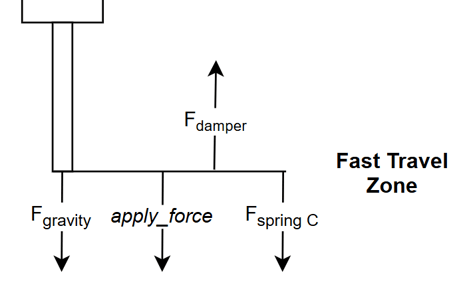
- When triggered, it moves rapidly through a Fast Travel Zone where no contact is expected.
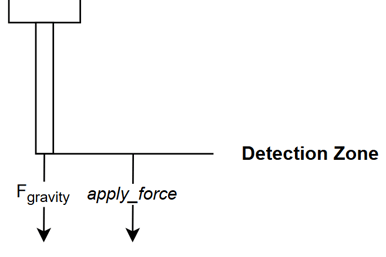
- The system transitions into a controlled approach in the Detection Zone
- When the shaft contacts the package, a defined force is applied, referred to as the apply_force.
- The system either holds the force for a specified time or immediately returns home.
- If the system reaches the End of Travel Bumper without a collision, immediately return home
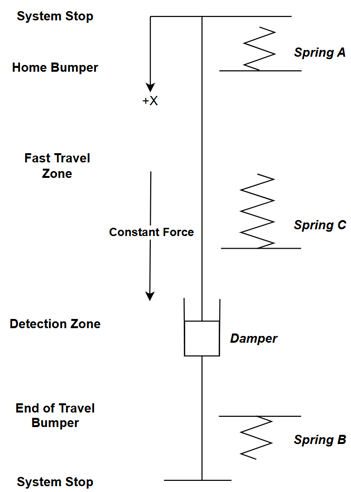
Haptic Effects Overview
Spring A - Home Bumper
This is configured as a high-gain single-direction spring used to slow the shaft near the home position.
This soft stop prevents the shaft from striking physical stops such as shaft collars or other mechanical components.
Spring A defines a stable equilibrium at the home position, minimizing the power required to hold the shaft in place.
Spring B - End of Travel Bumper
This spring acts as a soft stop at the opposite end of travel. If the motor cycles without a package present, Spring B prevents the shaft from contacting mechanical hard stops.
Spring C - Rapid Move
This spring is used to create the fast movement, slingshotting the shaft through the fast travel zone. This spring will be used to implement a section of travel with a constant force, creating a controlled acceleration region. This is done by using a very high gain and setting a saturation value. The saturation value becomes a system tuning parameter to determine how fast the shaft accelerates through the fast travel zone. The spring is one sided and ends where deceleration to the controlled approach speed will begin.
Damper - Speed Control
The damper effect interacts with the applied Constant Force to determine the steady-state approach speed.
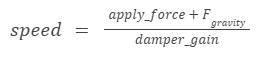
The damper gain combines with the applied force according to:

This relationship determines the constant approach velocity.
Constant Force - Apply/Return Trigger
The Constant Force effect is used at runtime to trigger transitions between system states.
Apply State
Set the Constant Force to the desired detect or pressing force.
System States
The actuator cycle uses two primary states in addition to the initial auto-zero procedure during startup.
- RETURN_HOME
- APPLY
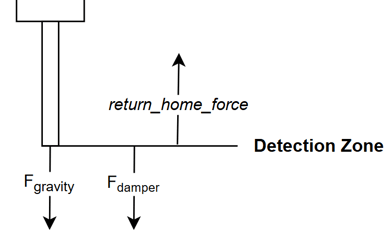
RETURN_HOME State
This state retracts the shaft and also acts as the idle state while waiting for the next cycle trigger.
In this state:
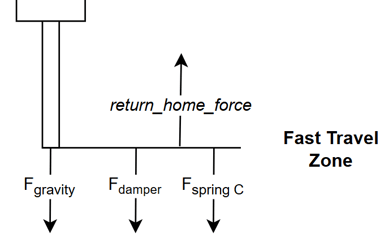
- Constant Force is set to a large negative value.
- The shaft accelerates upward toward the home position.
- Motion continues until the shaft enters the region defined by Spring A.
Spring A then compresses until equilibrium is reached when:

For motor_position < spring_A_position

The system stabilizes at this point, resting at the home position.
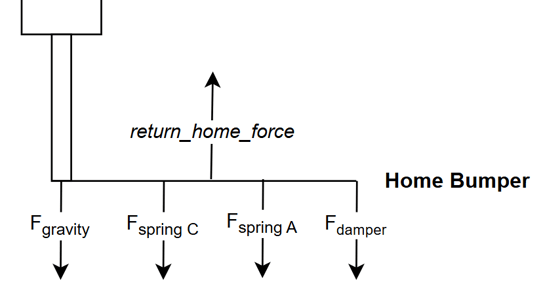
The return_home_force must be large enough to overpower both the damper and Spring C while in the Fast Travel Zone.
APPLY State
In the APPLY state, the Constant Force is switched from the return_home_force to apply_force.
At this point:
- Spring A releases
- Spring C accelerates the shaft downward
- Gravity assists the motion
This produces a rapid movement through the fast travel zone.
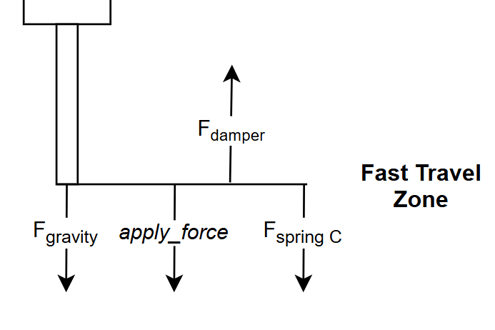
When the shaft reaches the end of Spring C, the remaining dynamics are:
-
system inertia
- force due to gravity
- apply_force
- damper force
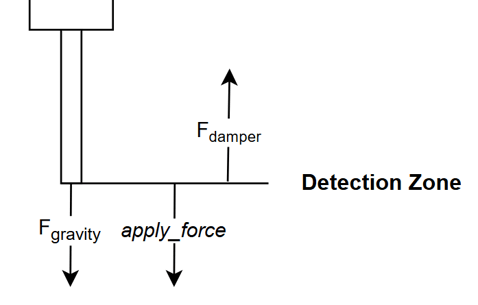
The damper produces a steady approach speed where:
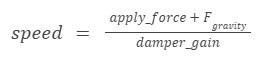
The shaft continues downward at this constant speed until it contacts the package.
At contact:
- Shaft velocity drops to zero
- Damping force disappears
- Only apply_force + gravity remains
This becomes the applied pressing force.
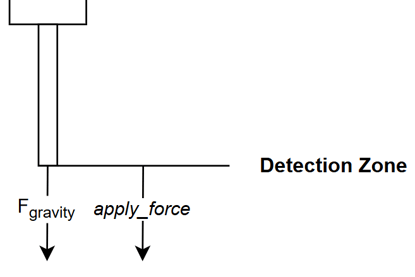
Once contact is detected, the system can:
- Hold the force for a specified duration
- Wait for an external trigger
- Immediately return home
- Rest at the bottom position without applying force by setting the apply_force = gravity
Detection
Reliable detection cannot rely solely on force measurements.
Instead, detection should use a combination of conditions:
- Speed = 0
- Force = apply_force
- Position < Spring B
When these conditions are met, the system can confidently determine that contact with the package has occurred.
This approach is robust and resistant to noise.
The system can also detect empty cycles when:
- Speed = 0
- Force ≈ negative Fgravity
- Position >= Spring B
This indicates the shaft reached the end of travel without encountering a package.
Tuning Notes
Equilibrium Home Position
In this the force due to Spring C will be equal to its saturation value due to the high spring gain.

Deceleration Distance
Increasing spring_C_position -> increase distance to reach target approach speed
Decrease spring_C_position -> decrease distance to reach target approach speed
Acceleration Force
Where the moving mass is a combination of the shaft and any attached components..

Retract Speed
Retract speed depends on multiple effects. However, by selecting a sufficiently large return_home_force, other effects (aside from Spring A) can be dominated.
Approach Speed:
Applied Force:

Note:
- The motor reports only the force it generates.
- The actual force applied to the package includes the weight of the shaft.
Initial impact force may also include inertial effects which are not directly measurable.
Communication
IrisControls
IrisControls is an accessible interface for testing and tuning purposes, which allows haptic effects to be configured and states to be altered by changing the Constant Force effect value.
PLC / Microcontroller
All motor functionality is also available through reading and writing to the ORCA motor’s Modbus registers. Configuration can be done and saved to the motor or done at the start of a program.
Then during runtime the following registers should be monitored:
- Position (µm) (342 low register, 343 high register)
- Speed (mm/s) (344 low register, 345 high register)
- Force (mN) (348 low register, 349 high register)
*Note these are all double wide registers and must be combined to a signed 32 bit integer
To control the state change, write to:
- Constant force (mN) (642 low register, 643 high register)
orcaSDK
The orcaSDK provides a direct function for configuring haptic effects and state control. An example program file is available.
